Notes for Running Tinc on an EdgeRouter (EdgeMAX)
Introduction
I have been running tinc on a Ubiquiti EdgeRouters for about five years. Tinc has been great for creating dynamic multipoint VPN tunnels between EdgeRouters for the purposes of extending private IPv4 address connectivity. The problem space and setup is straightforward. I am writing this post for the following reasons:
1- Most of the time this is a “set it and forget it” type setup, however, from time to time it requires some maintenance. The time in between the periods where I need to edit this setup (troubleshoot, add a new node ..etc) is quite long. I intend this document to be used as a reference for my future self.
2- From time to time, I find like-minded folks that desire to replicate some or all of the functionality I have already setup. I intend this document to be a reference for those folks. I do not intend this to be a step-by-step guide and/or walk-through for one to accomplish the same results.
Understand that all the command outputs in this post are edited to some degree. What’s outlined here is a simplification of my actual setup. I’ve edited out the distractions in an effort to make this post readable and understandable.
Problem and Motivation
I currently live in California and I have family and friends scattered around the midwest (mostly Wisconsin). For various reasons I generally find myself in a situation where it would be extremely convenient to connect to a LAN, remotely. It started off with simple things like wanting to be able to connect to a remote printer, or RDP into the parents’ PC to fix a problem. Nowadays it’s nice to be able to connect to the local network segment to set up IOT things, or punt all traffic out a different internet connection to circumvent IP based geo restrictions. The “nowadays” part is a bit trickier and requires a layer 2 VPN tunnel vs layer 3 connectivity.
To summarize the success criteria as I see it:
- Support N number of remote “sites” (where N <= 100)
- Only private IPv4 is required
- Always available layer 3 connectivity
- Optional layer 2 connectivity when needed (i.e. connect to remote “broadcast domain”)
- Remote sites must not require IPv6
- Remote sites must not require a unique public IPv4 address (i.e. CGNAT)
- Data plane must not be centralized (i.e. packets from site 3 to site 4 should not traverse site 1)
Solution and Design
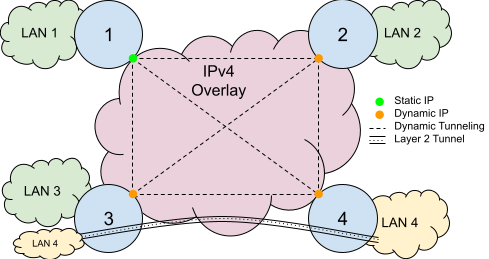
The following is a logical diagram of the solution I have come up with. Each site is numbered (1-4) with a LAN attached (in actuality, there are more). We have the ability to perform a layer 2 tunnel from one site to another. In this example, the site 4 LAN is extended to site 2 by a layer 2 tunnel. This allows things at site 3 to communicate directly on the broadcast domain of site 4.
We do require one node to have a static IP address. This is a sort of rendezvous point for the spokes. The hub is able to disseminate reachability information to the other spokes, so spoke to spoke communication can happen dynamically and without the packets transporting through the hub.
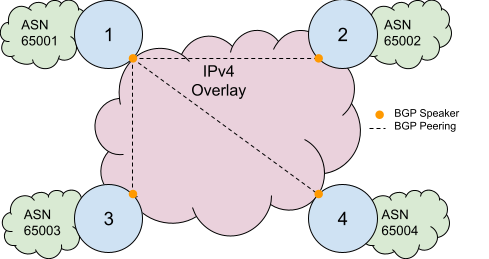
The diagram below depicts the routing setup. We use BGP to exchange network layer reachability information, providing end-to-end IP reachability. Each “site” is a different ASN, so we don’t have to do any route-reflection, which is nice I guess. I had previously used iBGP, however, I moved to eBGP when I was experimenting with wireguard. An eBGP setup has proven to be more flexible than an iBGP setup to support experiments with alternate VPN and routing technologies.
I have a lot of Cisco experience, and I actually like the DMVPN solution in this space. In fact before moving to EdgeRouters, I used to run DMVPN on Cisco 1841s to solve the above problems outlined. The drawbacks of DMVPN is that it’s proprietary, and expensive to run (both in terms of cost to acquire and cost to power the gear). EdgeRouters are much cheaper, and I’ve been rocking that for the last five plus years.
Because of the layer 2 tunneling and dynamic routing requirements, we use the switch mode of tinc. This mode allows us to create a logical “switch” or “bridge” across an arbitrary IP network, like the internet. This does add more overhead, however, the benefits outweigh the drawbacks for me.
Why didn’t I do something else?
Tinc isn’t the cool thing. Wireguard or tailscale/zerotier seem to be what the cool kids are using. And that’s fine. My requirements are different, and I can do things that can’t be done with other options. I generally prefer boring technology in general.
For wireguard, this message on the mailing list sums it up nicely. Basically the things that I like tinc for (dynamic nodes, STUN-like NAT traversal, auto PMTUD)) outweigh the performance gains of wireguard.
For tailscale/zerotier, these options require client side software to be installed. I can’t install this client side software on, say, a Roku.
Equipment
I use the a EdgeRouter Pro for the “hub,” and Edgerouter X for “spokes.” This is not an endorsement for these products. The links are provided as a reference (i.e. I’m not making any money on these links). This is simply a communication of the products that I use.
Preparing The System
Ubiquiti EdgeRouters are built on top of debian. Tinc is a .deb that may be installed on any (almost any?) debian system. But, we need to configure the package repositories to install. Ubiquiti’s official docs for setting up package repositories is here. Here’s a sample EdgeMAX configuration snippet:
configure

set system package repository wheezy components 'main contrib non-free'
set system package repository wheezy distribution wheezy
set system package repository wheezy url http://archive.debian.org/debian

commit
This is using v1 of EdgeMAX software. One day I’ll upgrade to v2 of the EdgeMAX software, but there’s no compelling reason to do so right now. A compelling reason to upgrade would be to address any security vulnerabilities, or get new features. I prefer to stay on the older releases because they tend to be more stable in my experience. Also, the newer versions seem to be pushing for a “unified” experience via their UNMS product. I have what I want, I don’t need this.
Next, we need to actually install tinc. At this time, I also like to install other packages that I generally find helpful and useful:
$ sudo bash
$ apt-get update && apt-get install -y \
    iftop \
    iptraf \
    mtr \
    bmon \
    nano \
    tinc \
    htop \
    tree \
    bridge-utils \
    dnsutils
Hub Configuration
Tinc requires at least one node to have a static IP. I call this the hub. Basically, the other nodes need to have a randevous point to discover the others.
/config is a special directly that survives reboots and software upgrades. We’re messing with things that the general EdgeMAX system does not take into account, so it’s good to put the tinc config in a place that EdgeMAX does not touch.
$ mkdir -p /config/tinc/tinc100
$ cd /config/tinc/tinc100
Hub Configuration File
Tinc has a lot of configuration options. It’s unreasonable to discuss them all. Here is an example of what I use for the hub:
$ cat /config/tinc/tinc100/tinc.conf
Name = hub
Mode = switch
Interface = tinc100
Port = 8000
Hub Public Private Key Pair
Here we generate the public and private key pairs for the hub. These are used for authentication and authorization and will later need to be distributed to the spokes.
$ mkdir -p /config/tinc/tinc100/hosts
$ touch /config/tinc/tinc100/hosts/hub
$ cd /config/tinc/tinc100
$ rm rsa_key.priv
$ tincd -K 2048 -c /config/tinc/tinc100
Generating 2048 bits keys:
......+++ p
...................................+++ q
Done.
Please enter a file to save private RSA key to [/config/tinc/tinc100/rsa_key.priv]:
Please enter a file to save public RSA key to [/config/tinc/tinc100/hosts/hub]:
Allow Spokes to Connect to Hub
One non-obvious thing we need to do is update the firewall of the EdgeRouter to actually allow the spokes to connect. This will vary based on the actual setup. Here eth0 is my “WAN” port and it protects traffic traversing to “local” (i.e. the system itself) by the IPV4_WAN_LOCAL firewall.
set interfaces ethernet eth0 firewall local name IPV4_WAN_LOCAL
#
set firewall name IPV4_WAN_LOCAL rule 60 action accept
set firewall name IPV4_WAN_LOCAL rule 60 description 'All VPN - tinc100'
set firewall name IPV4_WAN_LOCAL rule 60 destination port 8000
set firewall name IPV4_WAN_LOCAL rule 60 log disable
set firewall name IPV4_WAN_LOCAL rule 60 protocol tcp_udp
set firewall name IPV4_WAN_LOCAL rule 60 source
Spoke Configuration
Spokes are not required to have a static IP, or even a public IPv4 address (i.e. it can be behind a CGNAT).
/config is a special directly that survives reboots and software upgrades. We’re messing with things that the general EdgeMAX system does not take into account, so it’s good to put the tinc config in a place that EdgeMAX does not touch.
$ mkdir -p /config/tinc/tinc100
$ cd /config/tinc/tinc100
Spoke Configuration File
Tinc has a lot of configuration options. It’s unreasonable to discuss them all. Here is an example of what I use for a spoke:
$ cat /config/tinc/tinc100/tinc.conf
Name = spoke1
Mode = switch
ConnectTo = hub
Interface = tinc100
Port = 8000
Spoke Public Private Key Pair
Here we generate the public and private key pairs for a spoke. These are used for authentication and authorization and will later need to be distributed to the other spokes as well as the hub.
$ mkdir -p /config/tinc/tinc100/hosts
$ touch /config/tinc/tinc100/hosts/spoke1
$ cd /config/tinc/tinc100
$ tincd -K 2048 -c /config/tinc/tinc100
Generating 2048 bits keys:
......+++ p
...................................+++ q
Done.
Please enter a file to save private RSA key to [/config/tinc/tinc100/rsa_key.priv]:
Please enter a file to save public RSA key to [/config/tinc/tinc100/hosts/spoke1]:
Exchange Public Keys
All VPN tunnels are authenticated by a public/private key pair. There is management work to distribute them. This is also easily automatable, but that is out of scope for this document. We will describe where the keys must be in relation to the configuration files.
hub:
$ cat /config/tinc/tinc100/hosts/spoke
-----BEGIN RSA PUBLIC KEY-----
 <public key of spoke>
-----END RSA PUBLIC KEY-----
spoke:
$ cat /config/tinc/tinc100/hosts/hub
Address=192.0.2.123
Port=8000
-----BEGIN RSA PUBLIC KEY-----
 <public key of hub>
-----END RSA PUBLIC KEY-----
At this time, it’s also important to put in the Address and Port directive into the host file on the spoke, for the hub. Address may either be an IP address, or a DNS hostname. Obviously, Address and Port should be the correct reachability information for connecting to the hub.
Hooks and Scripts
Hooks and scripts are a very important part of tinc. When the state of the connection changes (i.e. VPN up/down), tinc can run scripts to setup/teardown interfaces.
tinc-up
tinc-up is run when the tinc100 VPN connects. Here is a sample tinc-up script I use.
$ cat /config/tinc/tinc100/tinc-up
#!/bin/sh
ip link add name bridge100 type bridge
ip link set bridge100 up
ip link set tinc100 master bridge100
ip link set dev tinc100 up
ip link set eth3.100 master bridge100
$
$ chmod +x /config/tinc/tinc100/tinc-up
In the above script, we create bridge100 as a bridge that connects both tinc100 and eth3.100. This provides a transparent bridge (i.e. layer 2 tunnel) between two tinc nodes. It’s important to remember that this script must be executable!
tinc-down
tinc-down is run when the tinc100 VPN disconnects. Here is a sample tinc-down script I use.
$ cat /config/tinc/tinc100/tinc-down
#!/bin/sh
ip link del dev bridge100
$
$ chmod +x /config/tinc/tinc100/tinc-down
In the above script, we create delete bridge100. One the bridge is deleted, the other interfaces that we attached to the bridge are automatically removed from the bridge, so we do not need to explicitly remove them. It’s important to remember that this script must be executable!
All Together now
Here is a sample of how the entire configuration structure should look on disk:
$ tree /config/tinc/
/config/tinc/
|-- tinc100
|   |-- hosts
|   |   |-- hub
|   |   `-- spoke
|   |-- rsa_key.priv
|   |-- rsa_key.pub
|   |-- tinc-down
|   |-- tinc-up
|   `-- tinc.conf
Start Tinc on System Startup
The /config/scripts/post-config.d dir is used to run arbitrary scripts when the system boots on an EdgeMAX system. We can use this to make sure tinc is started if the system reboots, like so:
$ cat /config/scripts/post-config.d/start_tinc.sh
#!/bin/bash
tincd -c /config/tinc/tinc100 -n tinc100
$
$ chmod +x /config/scripts/post-config.d/start_tinc.sh
BGP
This section will cover the BGP configuration and validation. The commands are very Cisco-like, so if you’re familiar with Cisco gear, this will feel familiar. BGP is ingrained into my head given my prior experience. This section is more for others than myself.
Hub BGP Configuration
This is the hub BGP Configuration. The configuration includes what I feel are the minimum necessary policies to keep the network reasonably safe. Only private IPv4 prefixes exchanged. This will prevent recursive routing that commonly happens in improperly setup overlay networks (which is what we have here).
# prefix lists for incoming updates
#   only allow select private IPv4 address ranges
set policy prefix-list SPOKES-IN rule 10 action permit
set policy prefix-list SPOKES-IN rule 10 le 32
set policy prefix-list SPOKES-IN rule 10 prefix 172.16.0.0/12
set policy prefix-list SPOKES-IN rule 1000 action deny
set policy prefix-list SPOKES-IN rule 1000 le 32
set policy prefix-list SPOKES-IN rule 1000 prefix 0.0.0.0/0
# prefix lists for outgoing updates
#   only allow select private IPv4 address ranges
set policy prefix-list SPOKES-OUT rule 10 action permit
set policy prefix-list SPOKES-OUT rule 10 le 32
set policy prefix-list SPOKES-OUT rule 10 prefix 172.16.0.0/12
set policy prefix-list SPOKES-OUT rule 1000 action deny
set policy prefix-list SPOKES-OUT rule 1000 le 32
set policy prefix-list SPOKES-OUT rule 1000 prefix 0.0.0.0/0
# BGP peering configuration
set protocols bgp 65000 neighbor 172.24.100.1 peer-group SPOKES
set protocols bgp 65000 neighbor 172.24.100.1 remote-as 65001
set protocols bgp 65000 network 172.24.0.0/24
set protocols bgp 65000 peer-group SPOKES prefix-list export SPOKES-OUT
set protocols bgp 65000 peer-group SPOKES prefix-list import SPOKES-IN
set protocols bgp 65001 parameters router-id 172.24.0.1
Spoke BGP Configuration
This is the hub BGP Configuration. This is drastically simpler than the hub and contains no policies. Policies should be added, but I didn’t in this case because I’m comfortable with the policies that exist at the hub. Use and edit at your discretion.
set protocols bgp 65001 neighbor 172.24.100.254 remote-as 65000
set protocols bgp 65001 network 172.24.1.0/24
set protocols bgp 65001 parameters router-id 172.24.1.1
Hub BGP Validation
Here are some basic commands to validate the BGP peering is up and exchanging prefixes.
$ show ip bgp summary
BGP router identifier 172.24.1.254, local AS number 65000
BGP table version is 438
6 BGP AS-PATH entries
0 BGP community entries

Neighbor                 V   AS   MsgRcv    MsgSen TblVer   InQ   OutQ    Up/Down   State/PfxRcd
172.24.100.1              4 65001 220741     220924     438      0      0  01w6d20h               1

$ show ip route bgp
IP Route Table for VRF "default"
B    *> 172.24.1.0/24 [20/0] via 172.24.100.1, tinc100, 01w6d20h
Here we can see that the peering is established and one prefix has been learned over the peering.
Spoke BGP Validation
Here are some basic commands to validate the BGP peering is up and exchanging prefixes.
$ show ip bgp summary
BGP router identifier 172.24.1.1, local AS number 64923
BGP table version is 176
6 BGP AS-PATH entries
0 BGP community entries

Neighbor                 V   AS   MsgRcv    MsgSen TblVer   InQ   OutQ    Up/Down   State/PfxRcd
172.24.100.254            4 65000 201280     201223     176      0      0  01w6d21h               9

Total number of neighbors 1

Total number of Established sessions 1

$ show ip route bgp
IP Route Table for VRF "default"
B    *> 172.24.2.0/24 [20/0] via 172.24.100.2, tinc100, 01w6d21h
B    *> 172.24.0.0/24 [20/0] via 172.24.100.254, tinc100, 01w6d21h
I left the route for “spoke 2” in this output to illustrate this setup more. Here we see there is only a single BGP peering, however, there are mutliple routes from different spokes learned via the peering. We also notice how the next hop for spoke 2 is not via the hub, it’s set to go directly to spoke 2. This means that the data plan will not traverse the hub and will go directly to the spoke (assuming tinc is doing its job correctly).
Testing and Troubleshooting
This section is a dump of testing and troubleshooting output for reference. This is helpful for validating successful or unsuccessful operation. When troubleshooting it can be helpful to run tinc in the foreground with a high level of verbosity. For example: tincd -c /config/tinc/tinc100 -n tinc100 -D -d7
Tinc Version
Sample output for fetching the tinc version.
$ tincd --version
tinc version 1.0.31
Mismatched Versions
Sample output when using two tinc versions that are not compatible.
$ tincd -c /config/tinc/tinc100 -n tinc100 -D -d7
Both netname and configuration directory given, using the latter...
tincd 1.0.31 starting, debug level 7
/dev/net/tun is a Linux tun/tap device (tap mode)
Listening on 0.0.0.0 port 8000
Listening on :: port 8000
Ready
Connection from 203.0.113.123 port 40977
Connection closed by <unknown> (203.0.113.123 port 40977)
Closing connection with <unknown> (203.0.113.123 port 40977)
Hub does not have Spoke’s Public Key
Sample output for the error condition when the Hub does not have the Spoke’s public key.
$ tincd -c /config/tinc/tinc100 -n tinc100 -D -d7
Both netname and configuration directory given, using the latter...
tincd 1.0.19 (Apr 22 2013 23:18:46) starting, debug level 7
/dev/net/tun is a Linux tun/tap device (tap mode)
Executing script tinc-up
Listening on 0.0.0.0 port 8000
Listening on :: port 8000
Ready
Trying to connect to hub (192.0.2.12 port 8000)
Read packet of 110 bytes from Linux tun/tap device (tap mode)
Learned new MAC address 26:9f:7f:b7:d4:e2
Broadcasting packet of 110 bytes from spoke (MYSELF)
Connected to hub (192.0.2.12 port 8000)
Sending ID to hub (192.0.2.12 port 8000): 0 spoke 17
Sending 13 bytes of metadata to hub (192.0.2.12 port 8000)
Got ID from hub (192.0.2.12 port 8000): 0 hub 17
Sending METAKEY to hub (192.0.2.12 port 8000): 1 94 64 0 0 614A74511F60C841D1BDD7C50C236A14F2F38FB61C06054A8C3E167D957607F795F7FCBCD729942B19989BF187A4E9FC783A7B3F1DBAC4CFFF73B91803E37403A3
Sending 525 bytes of metadata to hub (192.0.2.12 port 8000)
Flushing 538 bytes to hub (192.0.2.12 port 8000)
Connection closed by hub (192.0.2.12 port 8000)
Closing connection with hub (192.0.2.12 port 8000)
Could not set up a meta connection to hub
Trying to re-establish outgoing connection in 5 seconds
Purging unreachable nodes
Successful Operation
This is sample output of successful operation.
$ tincd -c /config/tinc/tinc100 -n tinc100 -D -d7
Both netname and configuration directory given, using the latter...
tincd 1.0.19 (Apr 22 2013 23:18:46) starting, debug level 7
/dev/net/tun is a Linux tun/tap device (tap mode)
Executing script tinc-up
Listening on 0.0.0.0 port 8000
Listening on :: port 8000
Ready
Trying to connect to hub (192.0.2.12 port 8000)
Read packet of 110 bytes from Linux tun/tap device (tap mode)
Learned new MAC address da:e1:e5:d4:31:20
Broadcasting packet of 110 bytes from spoke (MYSELF)
Read packet of 78 bytes from Linux tun/tap device (tap mode)
Broadcasting packet of 78 bytes from spoke (MYSELF)
Connected to hub (192.0.2.12 port 8000)
Sending ID to hub (192.0.2.12 port 8000): 0 spoke 17
Sending 13 bytes of metadata to hub (192.0.2.12 port 8000)
Got ID from hub (192.0.2.12 port 8000): 0 hub 17
Sending METAKEY to hub (192.0.2.12 port 8000): 1 94 64 0 0 96C1B8554EEB980753C3F3F385DA4BD356E19AF28F1422E6CF4604E24156C51F54AE5C184B70BE188EF23D43A11406B13EAC665443F2C15BB27EB2D0C2129696B
Sending 525 bytes of metadata to hub (192.0.2.12 port 8000)
Flushing 538 bytes to hub (192.0.2.12 port 8000)
Got METAKEY from hub (192.0.2.12 port 8000): 1 94 64 0 0 8E684DC1AB1FA1B07D90A697F31A4C910E9F04AF7B427FB81446E3307B43A02F43E872845E0E74FF5A712AB92A2A56C6F47066E5AD4844D4EE4344A473CA3C4942
Sending CHALLENGE to hub (192.0.2.12 port 8000): 2 B0C97A93A18207B201CCDCA9E781846BDE3DDD0738345DD7682197E72C14CA804E7F387E91AAF9D7A3AF2A98F4AA657D613EF574E1CA21B8A6FAABAC3B5B13C9D9809DEB
Sending 515 bytes of metadata to hub (192.0.2.12 port 8000)
Got CHALLENGE from hub (192.0.2.12 port 8000): 2 68C0BA23AF9996CD869B8B1F62D24EA05803C9B4A7D9E4F6D0D800EE4038E171FA621950EB15D0CDAC537C0C5AB19711BD3E347B6273F074D51133DC48F3BED80BC0F86144E3
Sending CHAL_REPLY to hub (192.0.2.12 port 8000): 3 85E6E346B42413C90C0218AFC31EF8ECC43EB7BC
Sending 43 bytes of metadata to hub (192.0.2.12 port 8000)
Flushing 558 bytes to hub (192.0.2.12 port 8000)
Got CHAL_REPLY from hub (192.0.2.12 port 8000): 3 3090D12DA80B2F3C053D6DC33072B298C16042A0
Sending ACK to hub (192.0.2.12 port 8000): 4 8000 682 c
Sending 13 bytes of metadata to hub (192.0.2.12 port 8000)
Got ACK from hub (192.0.2.12 port 8000): 4 8000 376 c
Connection with hub (192.0.2.12 port 8000) activated
Sending ADD_SUBNET to hub (192.0.2.12 port 8000): 10 266b7cc3 spoke da:e1:e5:d4:31:20#10
Sending 41 bytes of metadata to hub (192.0.2.12 port 8000)
Sending ADD_EDGE to everyone (BROADCAST): 12 4a2a814c spoke hub 192.0.2.12 8000 c 529
Sending 57 bytes of metadata to hub (192.0.2.12 port 8000)
Flushing 111 bytes to hub (192.0.2.12 port 8000)
Got ADD_EDGE from hub (192.0.2.12 port 8000): 12 1cd3e6c0 hub spoke 203.0.113.123 8000 c 529
Forwarding ADD_EDGE from hub (192.0.2.12 port 8000): 12 1cd3e6c0 hub spoke 203.0.113.123 8000 c 529
UDP address of hub set to 192.0.2.12 port 8000
Node hub (192.0.2.12 port 8000) became reachable
Sending ANS_KEY to hub (192.0.2.12 port 8000): 16 spoke hub 4B14F3BD938633E720C33C8993312FA95ED1CD6084AC94D7 91 64 4 0
Sending 80 bytes of metadata to hub (192.0.2.12 port 8000)
Got ANS_KEY from hub (192.0.2.12 port 8000): 16 hub spoke 48C98FC9352A7ABF0413385145C437666D5FC0FB3AA081DA 91 64 4 0
Sending MTU probe length 1022 to hub (192.0.2.12 port 8000)
Sending MTU probe length 1156 to hub (192.0.2.12 port 8000)
Sending MTU probe length 847 to hub (192.0.2.12 port 8000)
Flushing 80 bytes to hub (192.0.2.12 port 8000)
Got MTU probe length 1048 from hub (192.0.2.12 port 8000)
Got MTU probe length 1440 from hub (192.0.2.12 port 8000)
Got MTU probe length 684 from hub (192.0.2.12 port 8000)
Got MTU probe length 1022 from hub (192.0.2.12 port 8000)
Got MTU probe length 1156 from hub (192.0.2.12 port 8000)
Got MTU probe length 847 from hub (192.0.2.12 port 8000)
Read packet of 130 bytes from Linux tun/tap device (tap mode)
Broadcasting packet of 130 bytes from spoke (MYSELF)
Sending packet of 130 bytes to hub (192.0.2.12 port 8000)
Sending MTU probe length 1359 to hub (192.0.2.12 port 8000)
Sending MTU probe length 1400 to hub (192.0.2.12 port 8000)
Sending MTU probe length 1394 to hub (192.0.2.12 port 8000)
Got MTU probe length 1454 from hub (192.0.2.12 port 8000)
Got MTU probe length 1453 from hub (192.0.2.12 port 8000)
Got MTU probe length 1359 from hub (192.0.2.12 port 8000)
Got MTU probe length 1400 from hub (192.0.2.12 port 8000)
Got MTU probe length 1394 from hub (192.0.2.12 port 8000)


